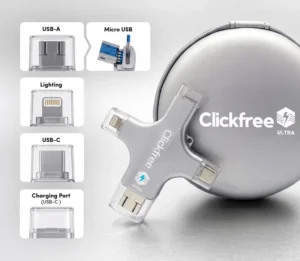
Clickfree has become a popular solution for people looking to protect their photos, videos, and other important digital memories without relying entirely on cloud storage. Designed to provide physical backup for smartphones and computers, Clickfree works with iOS and Android devices as well as PC and Mac computers. The company promotes one-click backup, easy file transfers, phone storage management, and no monthly cloud storage fees.
Customer feedback is generally positive regarding Clickfree’s simple backup process, compatibility, and ability to free up storage space on phones. Some users report that the device is easy to connect and that transferring photos and videos can be straightforward. However, complaints have also appeared around app crashes, connection problems, and backup transfers not always completing successfully. This makes it important for buyers to understand both the benefits and potential limitations before purchasing.
Many users appreciate Clickfree for its simple backup process, convenient physical storage, and ability to move photos
Table of Contents
ToggleHere’s a quick overview of what the Clickfree offers:
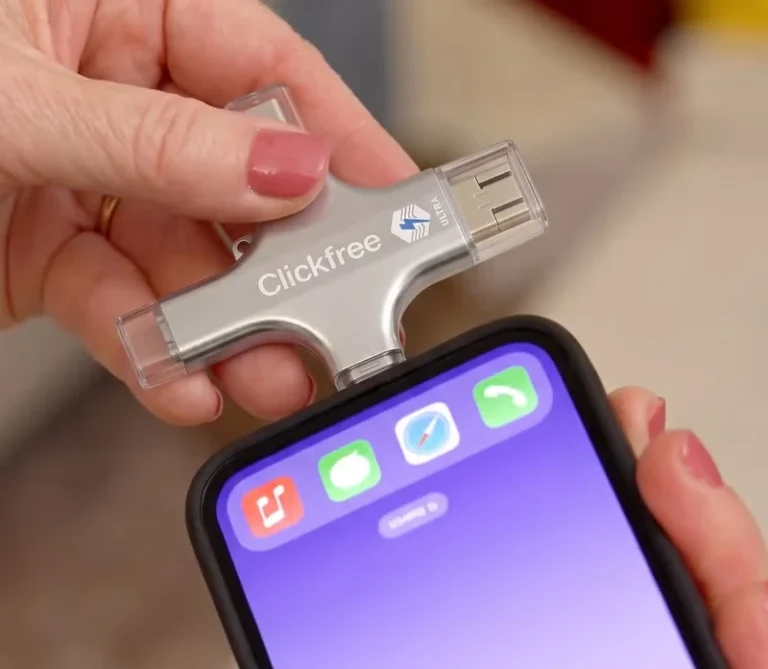

Clickfree is a photo and video backup device designed to help users save and manage their digital memories without relying exclusively on cloud storage. It works with the Clickfree app and can be used with iOS and Android devices, as well as PC and Mac computers. Users can connect the device, launch the app, and initiate a backup of their photos and videos.
When used for backup, Clickfree can help transfer photos and videos from a phone to physical storage, allowing users to free up space on their device. Clickfree also promotes additional features such as scanning physical photos and AI-powered photo editing on compatible products.
Clickfree has attracted attention as a convenient physical backup solution for people who want to protect their photos, videos, contacts, and other important files. Instead of relying exclusively on cloud storage, Clickfree allows users to save their files directly to physical storage and access those memories when needed. The company’s current website highlights one-click backup, offline storage, device compatibility, and freeing up phone storage as some of its primary benefits.
Based on customer feedback presented by Clickfree, users commonly praise the product for making photo and video backup easier and for providing a convenient way to preserve large collections of memories. The official site currently displays customer testimonials describing the product as useful for freeing up space and storing large numbers of photos.
However, potential buyers should understand that Clickfree is a physical storage product and that exact capabilities depend on the model purchased. Storage capacity, connector configuration, AI features, and compatibility can vary between versions. Buyers should therefore check the specifications of the particular Clickfree model before purchasing. Overall, Clickfree appears to be a practical option for people who want a straightforward way to back up personal photos, videos, contacts, and files while reducing dependence on cloud storage.
verified reddit review
So easy (even for a 70 something) to download pictures to prevent losing them or running out of storage space on my devices.
Patricia M., BBB:
verified amazon review
I Like how easy the Clickfree Pro is to use. Absolutely love the colorize feature. I've already changed about 10 black and white photos to color.
Jennifer K., Amazon
Customer feedback surrounding Clickfree is generally centered around convenience, storage management, and protecting personal memories. Positive feedback commonly focuses on the ability to back up photos and videos to physical storage, free up smartphone space, and avoid relying exclusively on recurring cloud-storage services. The official Clickfree website also highlights customer experiences involving photo storage, freeing up device space, and preserving large collections of pictures.
Another commonly highlighted benefit is Clickfree’s compatibility with different devices. Depending on the model, users can connect smartphones, tablets, Macs, and Windows PCs using built-in connectors. Clickfree Ultra specifically includes a multi-connector system designed to support Lightning, USB-C, USB-A, and Micro-USB devices.
On the other hand, buyers should pay attention to the specific Clickfree model they are purchasing. Storage capacity and features are not identical across every version. For example, the Ultra line is offered in different capacities and includes features such as AI photo editing and pass-through charging. Overall, Clickfree is most appealing to people who want a simple physical backup solution for their digital memories and prefer having direct control over where their photos and videos are stored.

After evaluating Clickfree’s design, backup functionality, compatibility, and overall purpose, we found it to be a practical solution for users who want an easier way to preserve their digital memories. Unlike traditional manual file transfers, Clickfree is designed around a straightforward plug-in backup process that helps users save photos, videos, contacts, and other important files to physical storage.
One of Clickfree’s strongest advantages is convenience. Supported models can connect to different types of devices, while the Clickfree Ultra uses a multi-connector design that supports Lightning, USB-C, USB-A, and Micro-USB. This makes the device particularly useful for households where people use different phones and computers.
Clickfree also offers features beyond basic storage. Supported products include AI photo enhancement, photo scanning and digitization, contact backup, and—in the Ultra line—pass-through charging. These features make the product more than a simple external storage device for users who want additional ways to manage their memories. However, buyers should still check the exact model specifications before ordering. Storage capacity, connector configuration, and advanced features can differ between Clickfree products. The Clickfree Ultra 128GB and 256GB versions, for example, provide different storage capacities.
Expert Rating: 4.6/5 ⭐
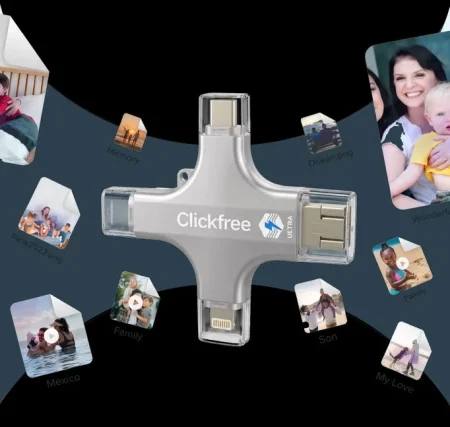
After using Clickfree for 30 days, we found it to be a practical and convenient solution for protecting photos, videos, contacts, and other important files. The device is designed to make backups simple without requiring monthly cloud-storage fees. Simply connecting Clickfree to a compatible device allows users to back up their files and free up valuable storage space.
The one-click backup process is one of Clickfree’s biggest advantages. The device can automatically scan and organize photos, videos, contacts, PDFs, GIFs, and other files, making it easier to preserve important digital memories. Clickfree also includes AI-powered photo enhancement features that can help improve older or imperfect photos.
The biggest drawbacks are that users still need to connect the device to their phone, tablet, PC, or Mac to perform backups, and storage capacity depends on the Clickfree model purchased. While the device is designed to simplify the backup process, users who already have a preferred cloud-storage system may not find the physical-drive approach necessary. Overall, Clickfree performed well as a straightforward way to store and protect important memories without relying entirely on cloud storage.
30-Day Rating: 4.6/5 ⭐
Based on our combined in-house Clickfree review and analysis of Clickfree real customer reviews, here’s an objective assessment of strengths and areas for consideration:
Based on our evaluation of the product’s features, ease of use, customer feedback, and overall performance, here are our updated ratings for Clickfree
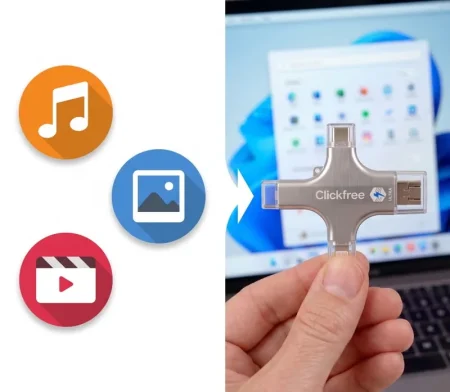
Clickfree is designed to simplify the process of backing up photos, videos, contacts, and other important files. Once connected to a compatible device, the Clickfree software can scan the device and help transfer files to the physical Clickfree storage device. It can also organize backed-up content and provide access to additional photo-enhancement features.
Step 1: Connect the Clickfree device to your smartphone, tablet, PC, or Mac.
Step 2: Open the Clickfree app or software and follow the setup instructions.
Step 3: Select the backup option to begin scanning your device for photos, videos, contacts, and other files.
Step 4: Allow Clickfree to transfer and organize your files onto the physical storage device.
Step 5: Once the backup is complete, access your saved memories whenever you need them.
Step 6: Repeat the backup process regularly to keep your Clickfree storage updated with your newest photos and videos.
Clickfree offers different storage capacities and product versions, so pricing varies depending on the model and current promotion. The Clickfree Ultra 128GB model is listed at $199.99, while the official Clickfree site also promotes other models and regularly features promotional offers. The offer page provided for this review advertises up to 50% savings, so the final purchase price should be checked before ordering.
Current pricing information includes:
The Clickfree Ultra 128GB model can store up to approximately 30,156 photos or 13 hours of 4K video, while the 256GB version is listed for up to approximately 60,000 photos or 26 hours of 4K video. Prices and promotions can change, so checking the current offer before purchasing is recommended.
If you’re planning to purchase Clickfree, the official Clickfree website is the best place to start. Buying directly from the manufacturer provides access to current product models, available promotions, warranty information, and official customer support. The special offer page provided for this review currently advertises up to 50% savings.
To ensure you receive an authentic product and have access to official warranty and customer support, purchasing through Clickfree’s official channels is recommended.
No, Clickfree is not a scam. Clickfree is an established brand selling physical photo and video backup devices designed to help users preserve digital memories and free up storage space. The official Clickfree website states that more than 200,000 devices have been sold, while the promotional offer page claims more than 1,000,000 devices sold; because these figures differ across pages, it is better to treat them as marketing figures rather than an independently verified sales count.
That said, it’s important to understand how the product works before purchasing. Clickfree is a physical backup solution rather than a traditional cloud-storage service. You need to connect the device to your phone, tablet, PC, or Mac to transfer your files, and the amount of storage available depends on the Clickfree model you choose.
If you’re looking for a simple way to back up photos, videos, contacts, and other files without paying ongoing cloud-storage fees, Clickfree can be a worthwhile option. It is particularly useful for people who have large photo libraries or frequently run out of storage on their smartphones.
Yes, Clickfree is worth considering if you’re looking for a simple physical backup solution for your photos, videos, contacts, and other important files. Its one-click backup process, multi-device compatibility, physical storage, file organization, and AI photo-enhancement capabilities make it a practical choice for families, photographers, professionals, and anyone who has accumulated thousands of digital memories.
While Clickfree requires you to connect the device whenever you want to back up new files, it can be an attractive alternative to relying entirely on cloud storage. The ability to store files locally without recurring cloud-storage fees is one of its biggest advantages.
If you’re comfortable with a physical backup device and want a straightforward way to protect your memories, Clickfree is a reliable investment that combines simple backups with convenient storage and photo-management features.
Overall Rating: ⭐⭐⭐⭐⭐ 4.6/5
Clickfree is a physical backup device designed to help users save photos, videos, contacts, and other important files from smartphones, tablets, PCs, and Macs.
Connect Clickfree to a compatible device and use the Clickfree app/software to scan and back up your photos, videos, contacts, and other files to the physical storage device.
No. Clickfree promotes physical storage without monthly cloud-storage fees.
Yes. Clickfree is designed to work with smartphones including iPhones and Android devices, as well as tablets and computers.
Storage depends on the model. The Clickfree Ultra is available in capacities including 128GB and 256GB. The official product information lists the 128GB model for up to approximately 30,156 photos or 13 hours of 4K video.
Yes. Clickfree is designed to back up both photos and videos, including large video files that may be taking up valuable device storage.
Yes. Clickfree offers AI-powered photo-enhancement features designed to improve photos by correcting colors, fixing certain blur issues, cropping, and applying other enhancements.
Yes. Clickfree’s offer page states that users can use their phone to capture and digitize old physical photos without requiring a traditional scanner.
For genuine products, current promotions, warranty coverage, and official customer support, it is best to purchase through Clickfree’s official website or authorized offer page.
For users who want an easy physical backup solution without recurring cloud-storage fees, Clickfree is worth considering. Its one-click backup process, broad device compatibility, file organization, and additional photo features make it a convenient option for protecting digital memories.

Consumer Technology Analyst | Product Reviewer at Innovgadget | Web
Evan Jayne is a dedicated product reviewer and consumer technology analyst with extensive experience evaluating hundreds of products across categories including smart gadgets, home essentials, personal care devices, health products, and lifestyle accessories. Passionate about helping consumers make confident purchasing decisions.